Most Asked Manual Testing Interview Questions for Freshers – 50+ Q&A
Most Asked Manual Testing Interview Questions for Freshers – 50+ Q&A
1. What do you mean by Software Testing?
Ans. Software testing is the process of evaluating a system to check if it satisfies its business requirements. It measures the overall quality of the system in terms of attributes. Like – correctness, completeness, usability, performance, etc. Basically, it is used for ensuring the quality of software to the stakeholders of the application.
2. Why is testing required?
Ans. We need software testing for the following reasons-
- Testing provides an assurance to the stakeholders that the product works as intended.
- Avoidable defects leaked to the end-user/customer without proper testing adds a bad reputation to the development company.
- Defects detected earlier phase of SDLC results in lesser cost and resource utilization of correction.
- Saves development time by detecting issues in an earlier phase of development.
- The testing team adds another dimension to the software development by providing a different viewpoint to the product development process.
3. What is Quality Assurance and what are the different activities involved in Quality assurance?
Ans. Quality assurance is a process-driven approach that checks if the process of developing the product is correct and conforming to all the standards. It is considered a preventive measure. This is because it identifies the weakness in the process to build software. It involves activities like document review, test case review, walk-throughs, inspection, etc.
4. What is Quality Control and what are the different types of testing involved in QC?
Ans. Quality control is a product-driven approach that checks that the developed product conforms to all the specified requirements. It is considered a corrective measure as it tests the built product to find the defects. It involves different types of testing like functional testing, performance testing, usability testing, etc.
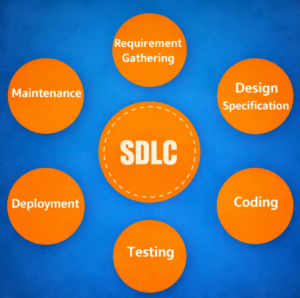
5. What is SDLC?
Ans. SDLC stands for Software Development Life Cycle. It refers to all the activities performed during software development – requirement gathering, requirement analysis, designing, coding or implementation, testing, deployment, and maintenance.
6. Explain the STLC – Software Testing life cycle.
Ans. The software testing life cycle refers to all the activities performed during the testing of a software product. The phases include-
- Requirement analysis and validation – In this phase, the requirements documents are analyzed and validated and the scope of testing is defined.
- Test planning – In this phase, the test plan strategy is defined, the estimation of test effort is defined along with the automation strategy, and tool selection is done.
- Test Design and Analysis – Here, test cases are designed, test data is prepared and automation scripts are implemented.
- Test environment setup – A test environment closely simulating the real-world environment is prepared.
- Test execution – The test cases are prepared, bugs are reported and retested once resolved.
- Test closure and reporting – A test closure report is prepared to have the final test results summary, learning, and test metrics.
7. What is a test plan?
Ans. A test plan is a formal document describing the scope of testing, the approach to be used, the resources required, and the time estimate for carrying out the testing process. It is derived from the requirement documents (Software Requirement Specifications).
8. What is the requirement traceability matrix(RTM)?
Ans. In software testing, a requirement traceability matrix is a table that relates the high-level requirements with detailed requirements, test plans, or test cases. RTM helps in ensuring 100% test coverage.
9. Explain the Agile methodology.
Ans. The agile methodology of software development is based on an iterative and incremental approach. In this model, the application is broken down into smaller builds on which different cross-functional teamwork together, providing rapid delivery along with adapting to changing needs at the same time.
Key Differences (Critical for Interviews)
10. What is the difference between Verification and Validation?
Ans. The following are the major differences between verification and validation-
- Verification is the process of evaluating the different artifacts as well as the process of software development. This is done in order to ensure that the product being developed will comply with the standards. Validation is the process of validating that the developed software product conforms to the specified business requirements.
- It is a static process of analyzing the documents and not the actual end product. It involves dynamic testing of a software product by running it.
- Verification is a process-oriented approach. Validation is a product-oriented approach.
- Answers the question – “Are we building the product right?” Answers the question – “Are we building the right product?”
- Errors found during verification require lesser cost/resources to get fixed than those found during the validation phase. Errors found during validation require more cost/resources. Later the error is discovered higher is the cost to fix it.
11. What is the difference between regression and retesting?
Ans. Regression testing involves testing the application to verify that a new code change doesn’t affect the other parts of the application. Whereas, in retesting, we verify if the fixed issue is resolved or not.
12. What is the difference between black-box and white-box testing?
Ans. Black-box testing is a type of testing in which the internal architecture of the code is not required for testing. It is usually applicable for system and acceptance testing. Whereas white-box testing requires internal design and implementation knowledge of the application being tested. It is usually applicable for Unit and Integration testing.
13. What is the difference between smoke and sanity testing?
Ans. The difference between smoke and sanity testing is-
- Smoke testing is a type of testing in which all major functionalities of the application are tested before carrying out exhaustive testing. Whereas, sanity testing is a subset of regression testing that is carried out when there is some minor fix in the application in a new build.
- In smoke testing, shallow-wide testing is carried out while in Sanity, narrow-deep testing (for a particular functionality) is done.
- The smoke tests are usually documented or automated. Whereas, the sanity tests are generally not documented or unscripted.
14. What is the difference between bug leakage and bug release?
Ans. Bug leakage is when the tested software is released into the market and the end-user finds bugs in it. These include the bugs that got missed by the testing team during the testing phase. Whereas, bug release is when a specific version of the software is released in the market with some known bugs which are intended to get fixed in later versions. These types of issues are of low priority and are mentioned in the release notes while sharing with the end-users.
15. What is the difference between testing and debugging?
Ans. Testing is primarily performed by the testing team in order to find the defects in the system. Whereas, debugging is an activity performed by the development team. In debugging the cause of the defect is located and fixed. Thus removing the defect and preventing any future occurrence of the defect as well. Another difference between the two is – testing can be done without any internal knowledge of software architecture. Whereas debugging requires knowledge of software architecture and coding.
Defect Management
16. What is a Bug?
Ans. A bug is a fault in a software product detected at the time of testing, causing it to function in an unanticipated manner.
17. What is a defect?
Ans. A defect is non-conformance with the requirement of the product detected in production (after the product goes live).
18. Explain the bug life cycle or the different states of a bug.
Ans. A bug goes through the following phases in software development-
- New – A bug or defect when detected is in a New state.
- Assigned – The newly detected bug when assigned to the corresponding developer is in the Assigned state.
- Open – When the developer works on the bug, the bug lies in the Open state.
- Rejected/Not a bug – A bug lies in rejected state in case the developer feels the bug is not genuine.
- Deferred – A deferred bug is one whose fix gets deferred for some time(for the next releases) based on the urgency and criticality of the bug.
- Fixed – When a bug is resolved by the developer it is marked as fixed.
- Test – When fixed the bug is assigned to the tester and during this time the bug is marked as in Test.
- Reopened – If the tester is not satisfied with the issue resolution the bug is moved to the Reopened state.
- Verified – After the Test phase, if the tester feels the bug is resolved, it is marked as verified.
- Closed – After the bug is verified, it is moved to Closed status.
19. What is defect priority?
Ans. A defect priority is an urgency of fixing the defect. Normally the defect priority is set on a scale of P0 to P3 with the P0 defect having the most urgency to fix.
20. What is defect severity?
Ans. Defect severity is the severity of the defect impacting the functionality. Based on the organization, we can have different levels of defect severity ranging from minor to critical or show stopper.
21. Give an example of Low priority-Low severity, Low priority-High severity, High priority-Low severity, and High priority-High severity defects.
Ans. Below are examples for different combinations of priority and severity-
- Low priority-Low severity – A spelling mistake in a page not frequently navigated by users.
- Low priority-High severity – Application crashing in some very corner cases.
- High priority-Low severity – Slight change in logo color or spelling mistake in the company name.
- High priority-High severity – Issue with login functionality.
22. What is a blocker?
Ans. A blocker is a bug of high priority and high severity. It prevents or blocks testing of some other major portion of the application as well.
23. What is a critical bug?
Ans. A critical bug is a bug that impacts a major functionality of the application and the application cannot be delivered without fixing the bug. It is different from the blocker bug as it doesn’t affect or block the testing of other parts of the application.
24. What do you mean by Defect Triage?
Ans. Defect triage is a process in which the defects are prioritized based on different factors like severity, risk, the time required to fix the bug, etc. The defect triage meeting includes the different stakeholders – the development team, testing team, project manager, BAs, etc, which decide the priority of fixing the defects.
Types & Levels of Testing
25. What are the different levels of testing?
Ans. Testing can be performed at different levels during the development process. Performing testing activities at multiple levels helps in the early identification of bugs. The different levels of testing are – Unit Testing, Integration Testing, System Testing, Acceptance Testing.
26. What is unit testing?
Ans. Unit testing is the first level of testing and it involves testing individual modules of the software. It is usually performed by developers.
27. What is integration testing?
Ans. Integration testing is performed after unit testing. In integration testing, we test the group of related modules. It aims at finding interfacing issues between the modules.
28. What are the different types of integration testing?
Ans. The different type of integration testing is-
- Big-bang Integration Testing – In big bang integration testing, testing starts only after all the modules are integrated.
- Top-down Integration Testing – In top-down integration, testing/integration starts from top modules to lower-level modules.
- Bottom-up Integration Testing – In bottom-up integration, testing starts from lower-level modules to higher-level modules up in the hierarchy.
- Hybrid Integration Testing – Hybrid integration testing is the combination of both Top-down and bottom-up integration testing. In this approach, the integration starts from the middle layer, and testing is carried out in both the direction
29. What is a stub?
Ans. In the case of top-down integration testing, many times lower-level modules are not developed while beginning testing/integration with top-level modules. In those cases, Stubs or dummy modules are used that simulate the working of modules by providing a hard-coded or expected output based on the input values.
30. What is a driver?
Ans. In the case of bottom-up integration testing, drivers are used to simulate the working of top-level modules in order to test the related modules lower in the hierarchy.
31. What is system testing?
Ans. System testing is the level of testing where the complete software is tested as a whole. The conformance of the application with its business requirements is checked in system testing.
32. What is acceptance testing?
Ans. Acceptance testing is testing performed by the potential end-user or customers to check if the software conforms to the business requirements and can be accepted for use.
33. What is UAT Testing?
Ans. UAT testing is the last phase of the testing lifecycle. Its main focus is to validate that software is working in accordance with business requirements. It also ensures that the application is user-friendly and can handle complex scenarios at its best before releasing the product to real-world users.
Performance & Other Testing Types
34. What is performance testing?
Ans. Performance testing is a type of non-functional testing in which the performance of the system is evaluated under expected or higher load. The various performance parameters evaluated during performance testing are – response time, reliability, resource usage, scalability, etc. The different types of performance testing are – Load, Stress, Endurance, Spike, and Volume Testing.
35. What is load testing?
Ans. Load testing is a type of performance testing that aims at finding an application’s performance under the expected workload. During load testing, we evaluate the response time, throughput, error rate, etc parameters of the application.
36. What is stress testing?
Ans. Stress testing is a type of performance testing in which an application’s behavior is monitored under a higher workload than expected. Stress testing is done to find memory leaks and the robustness of the application.
37. What is Adhoc Testing?
Ans. Adhoc testing is an unstructured way of testing that is performed without any formal documentation or proper planning.
38. What is exploratory testing?
Ans. Exploratory testing is a type of testing in which new test cases are added and updated while exploring the system or executing test cases. Unlike scripted testing, test design and execution go parallel in exploratory testing.
39. What is security testing?
Ans. Security testing is a type of testing that aims at evaluating the integrity, authentication, authorization, availability, confidentiality, and non-repudiation of the application under test.
Test Design Techniques
40. What is a Test case?
Ans. A test case is used to test the conformance of an application with its requirement specifications. It is a set of conditions with pre-requisites, input values, and expected results in a documented form.
41. Explain the different types of specification-based test design techniques.
Ans. Specification-based test design techniques are also referred to as black-box testing. It involves testing based on the specification of the system under test without knowing its internal architecture. The different types of specification-based test design or black box testing techniques are- Equivalence partitioning, Boundary value analysis, Decision tables, Cause-effect graph, State transition testing, Use case testing.
42. Explain equivalence class partitioning.
Ans. Equivalence class partitioning is a specification-based black-box testing technique. In equivalence class partitioning, a set of input data that defines different test conditions are partitioned into logically similar groups such that using even a single test data from the group for testing can be considered similar to using all the other data in that group.
43. What is boundary value analysis?
Ans. Boundary value analysis is a software testing technique for designing test cases wherein the boundary values of the classes of the equivalence class partitioning are taken as input to the test cases e.g. if the test data lies in the range of 0-100, the boundary value analysis will include test data – 0,1, 99, 100.
44. What is decision table testing?
Ans. Decision table testing is a type of specification-based test design technique or black-box testing technique in which testing is carried out using decision tables showing the application’s behavior based on different combinations of input values.
45. What is structure-based testing?
Ans. Structure-based test design techniques are also referred to as white box testing. In these techniques, the knowledge of the code or internal architecture of the system is required to carry out the testing. The various kinds of testing structure-based or white testing techniques are- Statement testing, Decision testing/branch testing, Condition testing, Multiple condition testing, Condition determination testing, Path testing.
46. What is code coverage?
Ans. Code coverage is the measure of the amount of code covered by the test scripts. It gives the idea of the part of the application covered by the test suite.
Automation Testing
47. What is manual testing?
Ans. Manual testing is a type of testing that involves validation of the requirements of the application by executing a predefined set of test cases manually without the use of any automation tool.
48. What is automation testing?
Ans. Automation testing is a type of software testing that involves automated test case execution using an automation tool. It helps in reducing the test execution time as the test scripts written once, can be run automatically any number of times without any human intervention.
49. What are some advantages of automation testing?
Ans. Some advantages of automation testing are-
- Test execution using automation is fast and saves a considerable amount of time.
- Carefully written test scripts remove the chance of human error during testing.
- Test execution can be scheduled for a nightly run using CI tools like Jenkins which can also be configured to provide daily test results to relevant stakeholders.
- Automation testing is much less resource-intensive. Once the tests are automated, test execution requires almost no time of QAs. Saving QA bandwidth for other exploratory tasks.
50. What are some disadvantages of automation testing?
Ans. Some disadvantages of automation testing are-
- It requires skilled automation testing experts to write test scripts.
- Additional effort to write scripts is required upfront.
- Automation scripts are limited to verification of the tests that are coded. These tests may miss some errors that are very glaring and easily identifiable to humans (manual QA).
- Even with some minor changes in the application, script updates, and maintenance are required.
General & Miscellaneous
51. When should we stop testing?
Ans. Testing (both manual and automated) can be stopped when one or more of the following conditions are met-
- After test case execution – The testing phase can be stopped when one complete cycle of test cases is executed after the last known bug fix with the agreed-upon value of pass-percentage
- Once the testing deadline is met – Testing can be stopped after deadlines get met with no high-priority issues left in the system.
- Based on Mean Time Between Failure (MTBF) – MTBF is the time interval between two inherent failures. Based on stakeholders’ decisions, if the MTBF is quite large, one can stop the testing phase.
- Based on code coverage value – The testing phase can be stopped when the automated code coverage reaches a specific threshold value with sufficient pass percentage and no critical bug.
52. What is Test data?
Ans. Test data is data that is used to test the software with different inputs and helps to check whether the corresponding output is as per the expected result or not. This data is created based on the business requirements.
53. What are some defect reporting attributes?
Ans. Some of the attributes of a Defect report are- DefectId, Defect Summary, Defect Description, Steps to reproduce, Expected Result, Actual Result, Defect Severity, Priority.
54. What is defect density?
Ans. Defect density is the measure of the density of the defects in the system. It can be calculated by dividing the number of defects identified by the total number of lines of code(or methods or classes) in the application or program.
55. What is Static Testing?
Ans. Static testing is a kind of testing for reviewing the work products or documentation that are being created throughout the entire project. It allows for reviewing the specifications, business requirements, documentation, processes, and functional requirements in the initial phase of testing.
56. What is Dynamic Testing?
Ans. The type of testing performed by executing or running the application under test either manually or using automation is called dynamic testing.
57. What is Test Coverage?
Ans. It is a metric that measures the amount of testing performed on software while executing the test cases. Test coverage for any software can be calculated as the percentage of the number of test areas or coverage items covered with respect to the total number of test areas.
58. What is usability testing?
Ans. Usability testing is the type of testing that aims at determining the ease of using the application. It aims at uncovering the usability defects in the application.
59. What are the entry criteria in software testing?
Ans. A set of prerequisites that are required to kick off the testing activity includes a Test environment, Test tool, Test Data, database connectivity, and many more.
60. What is the exit criteria in software testing?
Ans. An exit criteria is a formal set of conditions that specify the agreed-upon features or state of the application in order to mark the completion of the process or product.
Important Links & Resources :
Follow our WhatsApp group: Click here
Follow Us on Instagram: Click here
Follow our Telegram Channel: Click here
